=================================================
MassGen: Multi-Agent Scaling System for GenAI
=================================================
.. raw:: html

 .. raw:: html







|
.. raw:: html
 What is MassGen?
----------------
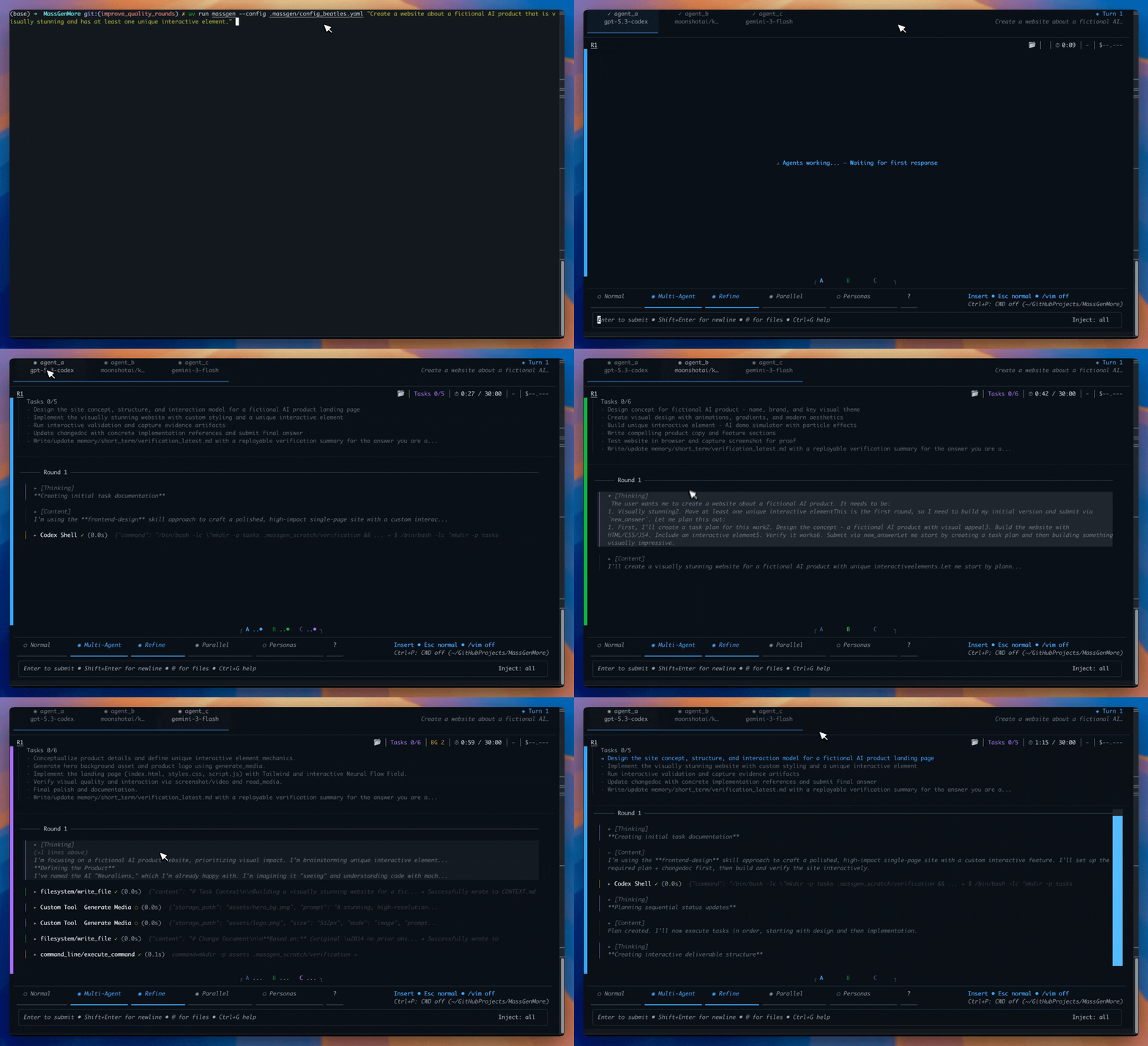
MassGen is a cutting-edge multi-agent system that leverages the power of collaborative AI to solve complex tasks. It assigns a task to multiple AI agents who work in parallel, observe each other's progress, and refine their approaches to converge on the best solution to deliver a comprehensive and high-quality result.
**How It Works:**
* **Work in Parallel** - Multiple agents tackle the problem simultaneously, each bringing unique capabilities
* **See Recent Answers** - At each step, agents view the most recent answers from other agents
* **Decide Next Action** - Each agent chooses to provide a new answer or vote for an existing answer
* **Share Workspaces** - When agents provide answers, their workspace is captured so others can review their work
* **Natural Consensus** - Coordination continues until all agents vote, then the agent with most votes presents the final answer
MassGen is a cutting-edge multi-agent framework that coordinates AI agents through **redundancy and iterative refinement**. Agents tackle the full problem, observe and build on each other's work across cycles of refinement and restarts, then vote — and the best collectively validated answer wins. This lays the groundwork for principled multi-agent scaling and self-improvement.
.. raw:: html
See visual comparisons between MassGen and single-agent solutions, highlighting how MassGen unifies different agentic approaches for better outcomes.
.. raw:: html
Use MassGen from Claude Code, Codex, Copilot, Cursor, and other AI coding agents.
How Does MassGen Compare?
-------------------------
**MassGen vs LLM Council:** While LLM Council follows a fixed 3-stage pipeline, MassGen agents autonomously decide to contribute new answers or vote for others, reaching consensus organically. Plus, MassGen agents can use tools, execute code, and read/write files in your codebase — backed by active development with regular releases. :doc:`See full comparison → `
Quick Start
-----------
.. tabs::
.. tab:: CLI
.. code-block:: bash
pip install uv # if needed
uv venv && source .venv/bin/activate
uv pip install massgen
uv run massgen # Setup wizard, then ask your first question
Rich terminal UI with real-time streaming, multi-turn conversations, and YAML configuration.
.. tab:: WebUI
.. code-block:: bash
pip install uv # if needed
uv venv && source .venv/bin/activate
uv pip install massgen
uv run massgen --web # Open http://localhost:8000
Browser-based UI with real-time agent streaming, vote visualization, and workspace browsing.
.. tab:: LiteLLM
.. code-block:: python
from dotenv import load_dotenv
load_dotenv() # Load OPENROUTER_API_KEY from .env
import litellm
from massgen import register_with_litellm
register_with_litellm()
response = litellm.completion(
model="massgen/build",
messages=[{"role": "user", "content": "Your question"}],
optional_params={"models": ["openrouter/openai/gpt-5", "openrouter/anthropic/claude-sonnet-4.5"]}
)
print(response.choices[0].message.content)
Standard OpenAI-compatible interface for seamless integration with existing applications.
:doc:`quickstart/installation` · :doc:`quickstart/running-massgen` · :doc:`quickstart/configuration`
Video Tutorials
---------------
.. raw:: html
Learn how to install, configure, and run your first multi-agent collaboration with MassGen.
.. raw:: html
Explore how to build custom agents and tools with MassGen.
Key Features
------------
.. grid:: 2
:gutter: 3
.. grid-item-card:: 🤝 Cross-Model Synergy
Use Claude, Gemini, GPT, Grok together - each agent can use a different model.
.. grid-item-card:: ⚡ Parallel Coordination
Multiple agents work simultaneously with voting and consensus detection.
.. grid-item-card:: 🛠️ Tools & MCP
Model Context Protocol for web search, code execution, file operations, and custom tools.
.. grid-item-card:: 🐍 Python & LiteLLM
Full async Python API and LiteLLM integration for seamless application embedding.
.. grid-item-card:: 📊 Live Visualization
Real-time terminal display showing agents' working processes and coordination.
.. grid-item-card:: 💬 Multi-Turn Sessions
Interactive conversations with context preservation across turns.
.. grid-item-card:: 🔗 Framework Interoperability
Integrate external frameworks (AG2, LangGraph, AgentScope, OpenAI, SmolAgent) as tools.
.. grid-item-card:: 📁 Project Integration
Work directly with your codebase using context paths with granular read/write permissions.
Recent Releases
---------------
**v0.1.68 (March 25, 2026)** - Checkpoint Mode
New checkpoint coordination mode with delegator pattern — main agent plans solo then delegates to team via ``checkpoint()`` tool. WebUI checkpoint support. LiteLLM supply chain fix.
**v0.1.67 (March 23, 2026)** - Modernized WebUI
Complete WebUI redesign with inline final answers, keyboard shortcuts, and Zustand state management. RoundBudgetGuardHook for per-round cost control. Unified parallel pre-collab phases. Regression guard for safe iterations.
**v0.1.66 (March 20, 2026)** - Step Mode
New ``--step`` CLI mode for external orchestrators to run one agent for one step then exit. Powers massgen-refinery plugin step mode. Codex Windows UTF-8 fixes and console text sanitization.
:doc:`Full changelog → `
Supported Models
----------------
**Claude** (Anthropic) · **Gemini** (Google) · **GPT** (OpenAI) · **Grok** (xAI) · **Azure OpenAI** · **Groq** · **Together** · **LM Studio** · :doc:`and more... `
Documentation
-------------
.. grid:: 3
:gutter: 2
.. grid-item-card:: 🚀 Getting Started
* :doc:`quickstart/installation`
* :doc:`quickstart/running-massgen`
* :doc:`quickstart/configuration`
.. grid-item-card:: 📖 User Guide
* :doc:`user_guide/concepts`
* :doc:`user_guide/skills`
* :doc:`user_guide/webui`
* :doc:`user_guide/tools/index`
* :doc:`user_guide/integration/index`
.. grid-item-card:: 📚 Reference
* :doc:`reference/cli`
* :doc:`reference/python_api`
* :doc:`reference/yaml_schema`
* :doc:`examples/basic_examples`
.. toctree::
:maxdepth: 2
:hidden:
:caption: Getting Started
quickstart/installation
quickstart/running-massgen
quickstart/configuration
.. toctree::
:maxdepth: 2
:hidden:
:caption: User Guide
user_guide/concepts
user_guide/skills
user_guide/task_planning
user_guide/backends
user_guide/webui
user_guide/tools/index
user_guide/files/index
user_guide/sessions/index
user_guide/integration/index
user_guide/advanced/index
user_guide/validating_configs
user_guide/logging
.. toctree::
:maxdepth: 2
:hidden:
:caption: Reference
reference/python_api
reference/cli
reference/yaml_schema
reference/mcp_server_registry
reference/configuration_examples
reference/timeouts
reference/supported_models
reference/comparisons
glossary
.. toctree::
:maxdepth: 2
:hidden:
:caption: Examples
examples/case_studies
examples/basic_examples
examples/advanced_patterns
examples/available_configs
.. toctree::
:maxdepth: 2
:hidden:
:caption: Development
development/contributing
development/writing_configs
development/architecture
development/roadmap
changelog
api/index
What is MassGen?
----------------
MassGen is a cutting-edge multi-agent system that leverages the power of collaborative AI to solve complex tasks. It assigns a task to multiple AI agents who work in parallel, observe each other's progress, and refine their approaches to converge on the best solution to deliver a comprehensive and high-quality result.
**How It Works:**
* **Work in Parallel** - Multiple agents tackle the problem simultaneously, each bringing unique capabilities
* **See Recent Answers** - At each step, agents view the most recent answers from other agents
* **Decide Next Action** - Each agent chooses to provide a new answer or vote for an existing answer
* **Share Workspaces** - When agents provide answers, their workspace is captured so others can review their work
* **Natural Consensus** - Coordination continues until all agents vote, then the agent with most votes presents the final answer
MassGen is a cutting-edge multi-agent framework that coordinates AI agents through **redundancy and iterative refinement**. Agents tackle the full problem, observe and build on each other's work across cycles of refinement and restarts, then vote — and the best collectively validated answer wins. This lays the groundwork for principled multi-agent scaling and self-improvement.
.. raw:: html
See visual comparisons between MassGen and single-agent solutions, highlighting how MassGen unifies different agentic approaches for better outcomes.
.. raw:: html
Use MassGen from Claude Code, Codex, Copilot, Cursor, and other AI coding agents.
How Does MassGen Compare?
-------------------------
**MassGen vs LLM Council:** While LLM Council follows a fixed 3-stage pipeline, MassGen agents autonomously decide to contribute new answers or vote for others, reaching consensus organically. Plus, MassGen agents can use tools, execute code, and read/write files in your codebase — backed by active development with regular releases. :doc:`See full comparison → `
Quick Start
-----------
.. tabs::
.. tab:: CLI
.. code-block:: bash
pip install uv # if needed
uv venv && source .venv/bin/activate
uv pip install massgen
uv run massgen # Setup wizard, then ask your first question
Rich terminal UI with real-time streaming, multi-turn conversations, and YAML configuration.
.. tab:: WebUI
.. code-block:: bash
pip install uv # if needed
uv venv && source .venv/bin/activate
uv pip install massgen
uv run massgen --web # Open http://localhost:8000
Browser-based UI with real-time agent streaming, vote visualization, and workspace browsing.
.. tab:: LiteLLM
.. code-block:: python
from dotenv import load_dotenv
load_dotenv() # Load OPENROUTER_API_KEY from .env
import litellm
from massgen import register_with_litellm
register_with_litellm()
response = litellm.completion(
model="massgen/build",
messages=[{"role": "user", "content": "Your question"}],
optional_params={"models": ["openrouter/openai/gpt-5", "openrouter/anthropic/claude-sonnet-4.5"]}
)
print(response.choices[0].message.content)
Standard OpenAI-compatible interface for seamless integration with existing applications.
:doc:`quickstart/installation` · :doc:`quickstart/running-massgen` · :doc:`quickstart/configuration`
Video Tutorials
---------------
.. raw:: html
Learn how to install, configure, and run your first multi-agent collaboration with MassGen.
.. raw:: html
Explore how to build custom agents and tools with MassGen.
Key Features
------------
.. grid:: 2
:gutter: 3
.. grid-item-card:: 🤝 Cross-Model Synergy
Use Claude, Gemini, GPT, Grok together - each agent can use a different model.
.. grid-item-card:: ⚡ Parallel Coordination
Multiple agents work simultaneously with voting and consensus detection.
.. grid-item-card:: 🛠️ Tools & MCP
Model Context Protocol for web search, code execution, file operations, and custom tools.
.. grid-item-card:: 🐍 Python & LiteLLM
Full async Python API and LiteLLM integration for seamless application embedding.
.. grid-item-card:: 📊 Live Visualization
Real-time terminal display showing agents' working processes and coordination.
.. grid-item-card:: 💬 Multi-Turn Sessions
Interactive conversations with context preservation across turns.
.. grid-item-card:: 🔗 Framework Interoperability
Integrate external frameworks (AG2, LangGraph, AgentScope, OpenAI, SmolAgent) as tools.
.. grid-item-card:: 📁 Project Integration
Work directly with your codebase using context paths with granular read/write permissions.
Recent Releases
---------------
**v0.1.68 (March 25, 2026)** - Checkpoint Mode
New checkpoint coordination mode with delegator pattern — main agent plans solo then delegates to team via ``checkpoint()`` tool. WebUI checkpoint support. LiteLLM supply chain fix.
**v0.1.67 (March 23, 2026)** - Modernized WebUI
Complete WebUI redesign with inline final answers, keyboard shortcuts, and Zustand state management. RoundBudgetGuardHook for per-round cost control. Unified parallel pre-collab phases. Regression guard for safe iterations.
**v0.1.66 (March 20, 2026)** - Step Mode
New ``--step`` CLI mode for external orchestrators to run one agent for one step then exit. Powers massgen-refinery plugin step mode. Codex Windows UTF-8 fixes and console text sanitization.
:doc:`Full changelog → `
Supported Models
----------------
**Claude** (Anthropic) · **Gemini** (Google) · **GPT** (OpenAI) · **Grok** (xAI) · **Azure OpenAI** · **Groq** · **Together** · **LM Studio** · :doc:`and more... `
Documentation
-------------
.. grid:: 3
:gutter: 2
.. grid-item-card:: 🚀 Getting Started
* :doc:`quickstart/installation`
* :doc:`quickstart/running-massgen`
* :doc:`quickstart/configuration`
.. grid-item-card:: 📖 User Guide
* :doc:`user_guide/concepts`
* :doc:`user_guide/skills`
* :doc:`user_guide/webui`
* :doc:`user_guide/tools/index`
* :doc:`user_guide/integration/index`
.. grid-item-card:: 📚 Reference
* :doc:`reference/cli`
* :doc:`reference/python_api`
* :doc:`reference/yaml_schema`
* :doc:`examples/basic_examples`
.. toctree::
:maxdepth: 2
:hidden:
:caption: Getting Started
quickstart/installation
quickstart/running-massgen
quickstart/configuration
.. toctree::
:maxdepth: 2
:hidden:
:caption: User Guide
user_guide/concepts
user_guide/skills
user_guide/task_planning
user_guide/backends
user_guide/webui
user_guide/tools/index
user_guide/files/index
user_guide/sessions/index
user_guide/integration/index
user_guide/advanced/index
user_guide/validating_configs
user_guide/logging
.. toctree::
:maxdepth: 2
:hidden:
:caption: Reference
reference/python_api
reference/cli
reference/yaml_schema
reference/mcp_server_registry
reference/configuration_examples
reference/timeouts
reference/supported_models
reference/comparisons
glossary
.. toctree::
:maxdepth: 2
:hidden:
:caption: Examples
examples/case_studies
examples/basic_examples
examples/advanced_patterns
examples/available_configs
.. toctree::
:maxdepth: 2
:hidden:
:caption: Development
development/contributing
development/writing_configs
development/architecture
development/roadmap
changelog
api/index