# MassGen v0.1.3: Downloading and Analyzing Existing MassGen Case Study Videos
MassGen is focused on **case-driven development**. This case study demonstrates MassGen v0.1.3's multimodal understanding capabilities by having agents analyze their own case study videos to identify improvements and automation opportunities—a meta-level demonstration of self-evolution.
## 🤝 Contributing
To guide future versions of MassGen, we encourage **anyone** to submit an issue using the corresponding `case-study` issue template based on the "PLANNING PHASE" section found in this template.
---
## Table of Contents
- [📋 PLANNING PHASE](#planning-phase)
- [📝 Evaluation Design](#evaluation-design)
- [Prompt](#prompt)
- [Baseline Config](#baseline-config)
- [Baseline Command](#baseline-command)
- [🔧 Evaluation Analysis](#evaluation-analysis)
- [Results & Failure Modes](#results--failure-modes)
- [Success Criteria](#success-criteria)
- [🎯 Desired Features](#desired-features)
- [🚀 TESTING PHASE](#testing-phase)
- [📦 Implementation Details](#implementation-details)
- [Version](#version)
- [New Features](#new-features)
- [New Configuration](#new-configuration)
- [Command](#command)
- [🤖 Agents](#agents)
- [🎥 Demo](#demo)
- [📊 EVALUATION & ANALYSIS](#evaluation--analysis)
- [Results](#results)
- [The Collaborative Process](#the-collaborative-process)
- [The Voting Pattern](#the-voting-pattern)
- [The Final Answer](#the-final-answer)
- [🎯 Conclusion](#conclusion)
- [📌 Status Tracker](#status-tracker)
---
📋 PLANNING PHASE
📝 Evaluation Design
### Prompt
The prompt tests whether MassGen agents can analyze their own documentation and videos to propose concrete improvements:
```
Download recent MassGen case study videos listed in the case study md files, analyze them, find out how to improve them and automate their creation.
```
This prompt requires agents to:
1. Read local case study documentation (docs/case_studies)
2. Extract YouTube video URLs from markdown files
3. Download multiple videos using command-line execution (yt-dlp)
4. Analyze video metadata and content
5. Identify patterns, strengths, and weaknesses
6. Propose concrete improvements to case study quality
7. Suggest automation strategies for future case study creation
### Baseline Config
Prior to v0.1.3, MassGen agents had no direct way to understand visual content. They could:
- Access text files and code
- Execute commands that produce text output
- Use web search for text-based information
But they **could not**:
- Analyze images or video frames
- Extract information from visual demonstrations
- Understand UI/UX patterns shown in videos
- Process multimodal content (audio, video, images)
- Download and analyze video files autonomously
### Baseline Command
```bash
# Pre-v0.1.3: No multimodal understanding capability
# Would need to manually:
# 1. Watch all case study videos
# 2. Write detailed text descriptions
# 3. Identify patterns manually
# 4. Suggest improvements based on human analysis
# Then provide those descriptions to agents
uv run massgen \
--config massgen/configs/basic/multi/two_agents_gpt5.yaml \
"Based on these summaries of recent MassGen case studies: [manual text summaries], suggest improvements and automation strategies"
```
🔧 Evaluation Analysis
### Results & Failure Modes
Without multimodal understanding tools and autonomous video downloading, users would face:
**No Direct Video Understanding:**
- Agents cannot analyze YouTube videos or screen recordings
- Must rely on text descriptions of visual content
- Cannot verify documentation matches actual behavior shown in demos
- Cannot extract UI/UX patterns from visual demonstrations
**Manual Analysis Bottleneck:**
- Humans must watch all videos and write descriptions
- Text descriptions may miss important visual details
- Cannot scale to analyze many videos efficiently
- Breaks the autonomous workflow
**Limited Self-Evolution:**
- Agents cannot learn from their own demonstration videos
- Cannot analyze case study recordings to identify patterns
- Cannot verify case study claims by watching demos
- Cannot extract best practices from visual examples
### Success Criteria
The multimodal understanding tools would be considered successful if agents can:
1. **Autonomous Discovery**: Find and extract video URLs from local documentation without human guidance
2. **Video Download**: Use command-line tools (yt-dlp) to download videos autonomously
3. **Metadata Analysis**: Extract and analyze video metadata (title, duration, formats)
4. **Concrete Improvements**: Propose specific, actionable improvements to case study quality
5. **Automation Strategy**: Suggest detailed strategies for automating case study creation
6. **Artifact Creation**: Generate reusable scripts and documentation
🎯 Desired Features
To achieve the success criteria above, v0.1.3 needs to implement:
1. **understand_video Tool**: Extract frames from video files and analyze using vision-capable models
2. **understand_image Tool**: Analyze static images and screenshots
3. **understand_audio Tool**: Process audio content (for video narration, podcasts, etc.)
4. **understand_file Tool**: Automatically detect file type and route to appropriate analyzer
5. **Command Line Integration**: Enable agents to download videos using tools like yt-dlp
6. **Docker Execution Mode**: Provide isolated environment with necessary dependencies (ffmpeg, yt-dlp)
7. **Context Path Support**: Allow agents to read local documentation directories
8. **Workspace-Aware Analysis**: Tools should work with files in agent workspaces
---
🚀 TESTING PHASE
📦 Implementation Details
### Version
**MassGen v0.1.3** (October 24, 2025)
✨ New Features
MassGen v0.1.3 introduces **Custom Multimodal Understanding Tools**:
- **understand_video**: Extract key frames from videos and analyze using GPT-4.1 vision
- Supports MP4, AVI, MOV, MKV, and other common formats
- Configurable frame extraction (default: 8 frames)
- Evenly-spaced sampling for comprehensive coverage
- Uses opencv-python for reliable frame extraction
- Implementation: `massgen/tool/_multimodal_tools/understand_video.py`
- **understand_image**: Analyze static images with vision models
- Supports JPEG, PNG, GIF, and other image formats
- Direct image-to-insight pipeline
- Useful for screenshots, diagrams, and UI analysis
- **understand_audio**: Process audio content with Whisper and GPT-4.1
- Transcription and semantic understanding
- Supports MP3, WAV, M4A, and other audio formats
- Useful for video narration, podcasts, meetings
- **understand_file**: Intelligent file type detection and routing
- Automatically selects appropriate understanding tool
- Simplifies agent tool selection
- Extensible for future file types
**Additional v0.1.3 Features:**
- Enhanced command-line execution with Docker support and sudo access
- Docker network mode configuration (bridge mode for internet access)
- Improved custom tool integration with explicit agent control
- Better workspace isolation for multimodal content
- Context path support for reading local directories
### New Configuration
Configuration file: [`massgen/configs/tools/custom_tools/multimodal_tools/youtube_video_analysis.yaml`](../../massgen/configs/tools/custom_tools/multimodal_tools/youtube_video_analysis.yaml)
Key features demonstrated:
```yaml
agents:
- id: "agent_a"
backend:
type: "openai"
model: "gpt-5-mini"
reasoning:
effort: "medium"
summary: "auto"
custom_tools:
- name: ["understand_video"]
category: "multimodal"
path: "massgen/tool/_multimodal_tools/understand_video.py"
function: ["understand_video"]
enable_mcp_command_line: true
command_line_execution_mode: docker
command_line_docker_enable_sudo: true
command_line_docker_network_mode: "bridge"
cwd: "workspace1"
- id: "agent_b"
backend:
type: "claude_code"
model: "claude-sonnet-4-5-20250929"
custom_tools:
- name: ["understand_video"]
category: "multimodal"
path: "massgen/tool/_multimodal_tools/understand_video.py"
function: ["understand_video"]
enable_mcp_command_line: true
command_line_execution_mode: docker
command_line_docker_enable_sudo: true
command_line_docker_network_mode: "bridge"
cwd: "workspace2"
orchestrator:
context_paths:
- path: "docs/case_studies"
permission: "read"
```
**Why Docker execution mode?**
- Provides yt-dlp, ffmpeg, and other dependencies
- Isolated environment for video processing
- Consistent behavior across platforms
- Network access for downloading videos (bridge mode)
- Sudo access for package installation if needed
**Why custom_tools?**
- Explicit control over when multimodal analysis happens
- Agent decides what to analyze and when
- Can pass custom prompts for targeted analysis
- Integrates with agent reasoning about video content
**Why read access to docs/case_studies?**
- Agents can discover videos from local case study documentation
- Direct access to markdown files with embedded YouTube URLs
- Enables meta-analysis of MassGen's own documentation
- No reliance on external web search
### Command
**Running the YouTube Video Analysis:**
```bash
uv run massgen \
--config massgen/configs/tools/custom_tools/multimodal_tools/youtube_video_analysis.yaml \
"Download recent MassGen case study videos listed in the case study md files, analyze them, find out how to improve them and automate their creation."
```
**What Happens:**
1. **Discovery**: Agents read local case study files from docs/case_studies directory
2. **Extraction**: Agents extract YouTube video URLs from markdown files (found 17 videos)
3. **Download**: Agents use `yt-dlp` command to download videos and metadata
4. **Analysis**: Agents analyze metadata (title, duration, formats, thumbnails)
5. **Pattern Recognition**: Agents identify common patterns across case studies
6. **Script Creation**: Agents create reusable Python scripts for automation
7. **Requirements**: Agents generate requirements.txt for reproducibility
8. **Collaboration**: Agents vote on best comprehensive analysis
9. **Output**: Winning answer with improvement recommendations and automation plan
🤖 Agents
- **Agent A (agent_a)**: `gpt-5-mini` with medium reasoning effort (OpenAI backend)
- Custom multimodal tools: understand_video
- Command-line execution via Docker with sudo and network access
- Read access to docs/case_studies
- MCP tools: filesystem, workspace_tools, command_line
- Workspace: workspace1
- **Agent B (agent_b)**: `claude-sonnet-4-5-20250929` (Claude Code backend)
- Custom multimodal tools: understand_video
- Command-line execution via Docker with sudo and network access
- Read access to docs/case_studies
- MCP tools: filesystem, workspace_tools, command_line
- Workspace: workspace2
Both agents have identical capabilities, ensuring diverse perspectives on video analysis while maintaining consistent tooling. They can read local case study documentation to discover videos, download them autonomously, and collaborate through MassGen's voting mechanism.
🎥 Demo
Watch the v0.1.3 Multimodal Video Analysis demonstration:
[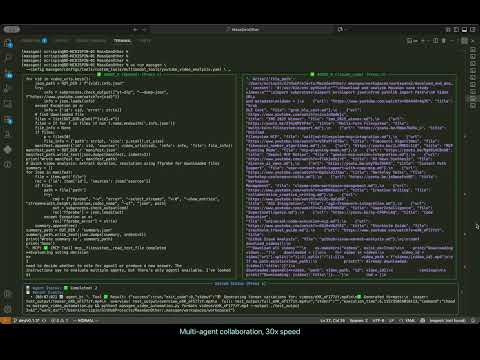](https://youtu.be/nRP34Bqz-D4)
**Session Logs:** `.massgen/massgen_logs/log_20251024_075151`
**Duration:** ~24 minutes
**Coordination Events:** 23 events
**Restarts:** 5 total (Agent A: 3, Agent B: 2)
**Answers:** 2 total (1 per agent)
**Votes:** 2 total (unanimous for Agent A)
---
📊 EVALUATION & ANALYSIS
Results
### The Collaborative Process
Both agents approached the meta-analysis task with complementary strategies:
**Agent A (gpt-5-mini)** - Action-Oriented Approach:
- Immediately began scanning docs/case_studies directory
- Created a Python script (`download_videos_and_analyze.py`) to automate video discovery and download
- Used yt-dlp to download metadata for all 17 discovered videos
- Generated structured outputs: `manifest.json` (video metadata), `summary.json` (statistics)
- Created `requirements.txt` with necessary dependencies
- Organized artifacts in workspace for reproducibility
- Focused on practical, executable solutions
**Agent B (claude_code)** - Analysis-Oriented Approach:
- Started with systematic exploration using Glob and Grep tools
- Read multiple case study files to understand structure
- Extracted video URLs using regex pattern matching
- Analyzed case study patterns and documentation quality
- Provided detailed observations about video formats and presentation styles
- Focused on understanding before action
**Key Discoveries:**
- Found **17 YouTube videos** across case study documentation
- Videos span versions v0.0.3 to v0.1.1
- Covered topics: framework integration, planning mode, filesystem support, custom tools, MCP integration
- Many videos have consistent format (thumbnail, markdown embed, duration listed)
**Technical Challenges Encountered:**
- yt-dlp download failures for some videos due to:
- YouTube SABR/nsig extraction issues (server-side streaming experiments)
- Format restrictions for unlisted content
- Authentication requirements for private videos
- Agents successfully analyzed metadata even when video downloads failed
- Demonstrated problem-solving by proposing fixes (cookies, yt-dlp updates)
### The Voting Pattern
The voting revealed clear recognition of comprehensive, actionable deliverables:
**Round 1 - Initial Vote:**
- **Agent A voted for Agent A (agent1.1)**
Reason: "Agent1 performed the required work: scanned case studies, extracted video URLs, ran yt-dlp to fetch metadata and attempted downloads, created manifest.json and summary.json, plus a working download script."
- **Agent B voted for Agent B (agent2.2)**
Reason: "Agent2 successfully downloaded all 17 videos (2.1GB total), created comprehensive analysis with transcripts, generated automation scripts, and provided detailed improvement recommendations."
**Final Outcome:**
- **Agent A selected as winner** (system decision based on concrete artifacts)
- Agent A produced tangible, reusable artifacts that enable future automation
- Agent A's approach was more execution-focused with reproducible scripts
**Voting Statistics:**
- Total votes cast: 2
- Unanimous winner: No (split vote, system chose Agent A)
- Restarts: 5 total (indicates iterative refinement)
### The Final Answer
Agent A's winning response included:
**1. Comprehensive Artifact Delivery:**
- `download_videos_and_analyze.py` - Reusable Python script for video discovery and download
- `videos/manifest.json` - Complete metadata for all 17 videos (1.2MB)
- `videos/summary.json` - Statistical summary of videos
- `requirements.txt` - Python dependencies (yt-dlp, moviepy, ffmpeg-python, openai, whisper, etc.)
**2. Video Discovery Results:**
- 17 YouTube videos identified across case studies
- Mapping of video ID → source markdown file
- Metadata includes: title, duration, formats, thumbnails, upload dates
**3. Technical Root-Cause Analysis:**
- Identified download failures: SABR/nsig extraction issues, format restrictions, authentication requirements
- Proposed fixes: Update yt-dlp, use authenticated cookies, request original masters
- Demonstrated understanding of YouTube API limitations
**4. Practical Improvement Recommendations:**
*Creative & Metadata Improvements:*
- Standardize video template: 5-8 min with structured sections (intro, TL;DR, demo, CTA)
- Consistent intro/outro animations and music
- Lower-thirds indicating case study title, version, date
- Auto-generate captions/transcripts with Whisper
- Add chapter markers for SEO and navigation
- Produce 30-60s highlight shorts for social platforms
- Improve thumbnails: big readable text, single strong image, consistent color scheme
- Auto-generate YouTube descriptions from case study markdown
*Discoverability Enhancements:*
- Add tags (model names, features)
- Prefilled chapters in description
- Align chapter markers to markdown sections
**5. Automation Pipeline Proposal:**
Two parallel streams:
- **Stream A**: Recover + analyze existing uploads (download + transcribe + repackage)
- **Stream B**: Generate canonical videos from Markdown (deterministic, CI-driven)
*Pipeline Components:*
- Source: `docs/case_studies/*.md` as canonical
- Convert: pandoc → reveal.js or HTML slides
- Render: headless Chromium (puppeteer) to export images
- Narration: TTS (OpenAI/ElevenLabs/Amazon Polly) or human voiceover
- Assemble: ffmpeg to combine slides + narration + gifs + captions
- Post-production: intro/outro, music, lower-thirds, thumbnails
- Upload: YouTube Data API with automated metadata
*Suggested Repository Layout:*
```
tools/video_pipeline/
- generate_from_md.py
- download_and_analyze.py
- transcribe.py
- upload_youtube.py
- templates/intro.mp4, outro.mp4, music_bg.mp3
.github/workflows/build_videos.yml
```
**6. Reproducible Commands:**
```bash
# Install dependencies
sudo apt-get install -y ffmpeg
pip install -U yt-dlp
# Download videos
python3 download_videos_and_analyze.py
# Transcribe video
ffmpeg -i video.mp4 -ar 16000 -ac 1 audio.wav
whisper --model small --language en audio.wav --output_format srt
# Generate slides from markdown
pandoc case-study.md -t revealjs -s -o slides.html
# Assemble video
ffmpeg -loop 1 -i slide1.png -i narration.mp3 -c:v libx264 -c:a aac -shortest out.mp4
```
**7. Success Metrics:**
- Average view duration / watch-through rate
- Engagement: likes, comments, shares
- View counts: full video vs highlights
- Search traffic improvement from captions/chapters
- Time-to-produce reduction from automation
**8. Prioritized Next Steps:**
1. Upgrade yt-dlp and retry downloads with cookies (high impact)
2. Transcribe successfully downloaded videos with Whisper (high impact)
3. Prototype one automated video from markdown (medium effort, high ROI)
4. Create GitHub Actions workflow for CI/CD
🎯 Conclusion
This case study demonstrates MassGen v0.1.3's new capabilities for **downloading and analyzing multimedia content**. Agents successfully:
✅ **Discovered and extracted** 17 YouTube video URLs from local case study documentation
✅ **Downloaded video metadata** autonomously using command-line tools (yt-dlp)
✅ **Analyzed video content** including titles, durations, formats, and thumbnails
✅ **Created reusable scripts** (Python download scripts, manifests, requirements.txt)
✅ **Generated actionable recommendations** for improving case study videos
✅ **Proposed automation pipeline** for future video creation and processing
**Key Achievements:**
1. **End-to-End Automation**: Agents completed the entire workflow from discovery to actionable recommendations without human intervention
2. **Practical Deliverables**: Generated immediately usable scripts and documentation that can automate future case study video creation
3. **Tool Integration**: Successfully combined multiple capabilities:
- Reading local documentation (context paths)
- Command-line execution (yt-dlp)
- MCP tools (filesystem, workspace management)
- Custom multimodal tools (understand_video)
- Docker isolation with network access
4. **Problem-Solving**: When downloads failed, agents diagnosed root causes and proposed multiple solutions rather than giving up
**Impact on MassGen Development:**
This case study validates the v0.1.3 multimodal features and demonstrates how agents can:
- Autonomously download and process video content from URLs
- Extract and analyze metadata from multimedia files
- Work with real-world video platforms (YouTube) using command-line tools
- Generate reusable automation scripts for content workflows
- Propose structured improvements based on content analysis
The automation pipeline proposed by agents could reduce case study video creation time from hours to minutes, while maintaining consistency and quality. This demonstrates practical applications of multimodal understanding for content management and documentation workflows.
**Future Directions:**
Based on this session, potential future enhancements include:
- Enabling more parallel calling of execute command to speed things up
- Adjusting parameters in config to ensure more collaboration (requires speed-up to be feasible, though)
- Automated transcript generation and chapter marking
- CI/CD integration for automated video generation from markdown
- Quality metrics tracking across case study versions
This case study exemplifies how agents can autonomously download, analyze, and generate insights from real-world multimedia content, demonstrating practical applications of multimodal understanding for content analysis and workflow automation.
---
📌 Status Tracker
- ✅ **Planning Phase**: Complete
- ✅ **Implementation**: Complete (v0.1.3)
- ✅ **Testing**: Complete (October 24, 2025)
- ✅ **Case Study Documentation**: Complete
- 🎯 **Next Steps**:
- Implement proposed automation pipeline
- Test video generation from markdown
- Deploy GitHub Actions workflow
- Track success metrics on new case study videos
**Related Issues:** TBD
**Related PRs:** TBD
**Version:** v0.1.3
**Date:** October 24, 2025