# 📝 tslog: Beautiful logging experience for TypeScript and JavaScript

[![lang: Typescript](https://img.shields.io/badge/Language-Typescript-Blue.svg?style=flat-square)](https://www.typescriptlang.org)

![License: MIT](https://img.shields.io/npm/l/tslog?logo=tslog&style=flat-square)
[![npm version](https://img.shields.io/npm/v/tslog?color=76c800&logoColor=76c800&style=flat-square)](https://www.npmjs.com/package/tslog)
![CI: GitHub](https://github.com/fullstack-build/tslog/actions/workflows/ci.yml/badge.svg)
[![codecov.io](https://codecov.io/github/fullstack-build/tslog/coverage.svg?branch=v4)](https://codecov.io/github/fullstack-build/tslog?branch=master)
[![code style: prettier](https://img.shields.io/badge/code_style-prettier-ff69b4.svg?style=flat-square)](https://github.com/prettier/prettier)

[![](https://img.shields.io/static/v1?label=Sponsor&message=%E2%9D%A4&logo=GitHub&color=%23fe8e86)](https://github.com/sponsors/fullstack-build)
[![GitHub stars](https://img.shields.io/github/stars/fullstack-build/tslog.svg?style=social&label=Star)](https://github.com/fullstack-build/tslog)


> Powerful, fast and expressive logging for TypeScript and JavaScript
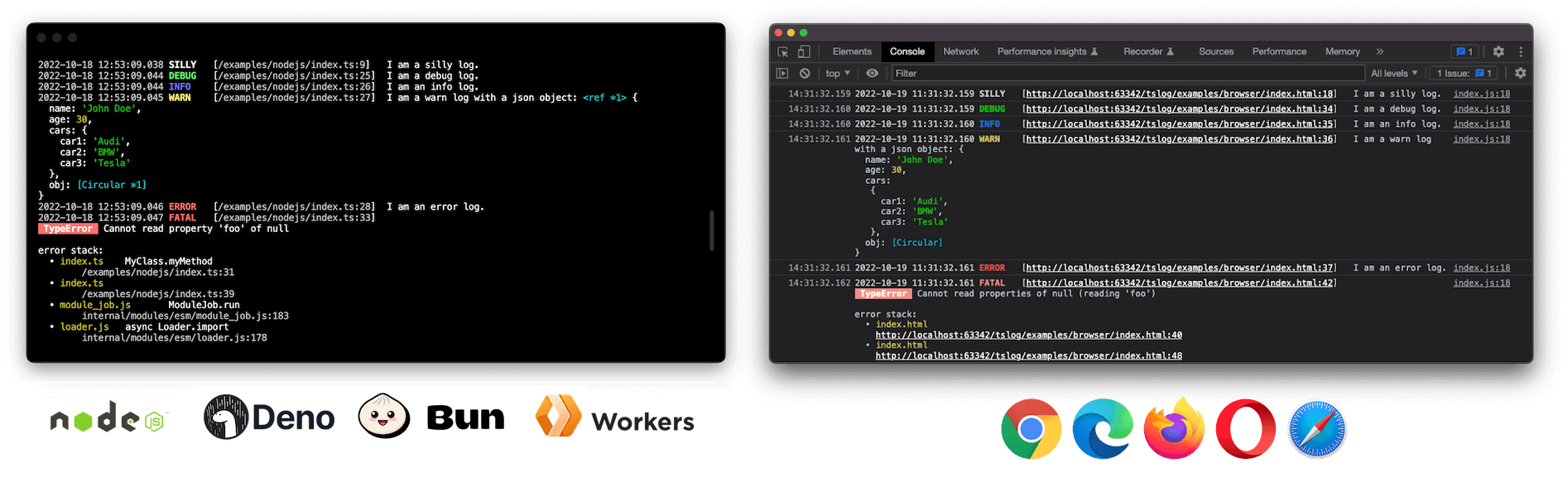
![tslog pretty output](https://raw.githubusercontent.com/fullstack-build/tslog/master/docs/assets/tslog.png "tslog pretty output in browser and Node.js")


## Highlights

⚡ **Fast and powerful**<br>
🪶 **Lightweight and flexible**<br>
🏗 **Universal: Works in Browsers, Node.js, Deno and Bun**<br>
👮‍️ **Fully typed with TypeScript support (native source maps)**<br>
🗃 **_Pretty_ or `JSON` output**<br>
📝 **Customizable log level**<br>
⭕️ **Supports _circular_ structures**<br>
🦸 **Custom pluggable loggers**<br>
💅 **Object and error interpolation**<br>
🤓 **Stack trace and pretty errors**<br>
👨‍👧‍👦 **Sub-logger with inheritance**<br>
🙊 **Mask/hide secrets and keys**<br>
📦 **CJS & ESM with tree shaking support**<br>
✍️ **Well documented and tested**<br>

## Example

```typescript
import { Logger, ILogObj } from "tslog";

const log: Logger<ILogObj> = new Logger();
log.silly("I am a silly log.");
```

## [Become a Sponsor](https://github.com/sponsors/fullstack-build)
Donations help me allocate more time for my open source work.

[![](https://img.shields.io/static/v1?label=Sponsor&message=%E2%9D%A4&logo=GitHub&color=%23fe8e86)](https://github.com/sponsors/fullstack-build)


## Install

```bash
npm install tslog
```

### Node.js

Enable native ESM by setting `"type": "module"` and run Node with source maps for accurate stack traces:

```json5
{
  "name": "NAME",
  "version": "1.0.0",
  "type": "module",
  "scripts": {
    "build": "tsc -p .",
    "start": "node --enable-source-maps dist/index.js"
  },
  "dependencies": {
    "tslog": "^4"
  }
}
```

After building (`npm run build`), start your app with:

```bash
npm start
```

Other handy entry points:

- `node --enable-source-maps dist/index.cjs` – run the CommonJS bundle.
- `node --enable-source-maps --loader ts-node/esm src/index.ts` – execute TypeScript via `ts-node` in ESM mode.
- `node --enable-source-maps --require ts-node/register src/index.ts` – execute TypeScript via `ts-node` in CommonJS mode.

### Deno

```ts
// main.ts
import { Logger } from "npm:tslog";

const logger = new Logger();
logger.info("Hello from Deno");
```

```bash
deno run main.ts
# grant optional metadata access: deno run --allow-env main.ts
```

### Bun

```ts
// main.ts
import { Logger } from "tslog";

const logger = new Logger();
logger.info("Hello from Bun");
```

```bash
bun run main.ts
# or add "dev": "bun run src/main.ts" to package.json scripts
```

Browser:
```html
<!doctype html>
<html lang="en">
<head>
<title>tslog example</title>
</head>
<body>
<h1>Example</h1>

<script src="tslog.js"></script>

<script>
  const logger = new tslog.Logger();
  logger.silly("I am a silly log.");
</script>

</body>
</html>
```

**Enable TypeScript source map support:**

This feature enables `tslog` to reference a correct line number in your TypeScript source code.

```json5
// tsconfig.json
{
  // ...
  compilerOptions: {
    // ...
    "inlineSourceMap": true,  // <!-- here
    // we recommend using a current ES version
    target: "es2020",
  },
}
```

## Simple example

```typescript
import { Logger } from "tslog";

const logger = new Logger({ name: "myLogger" });
logger.silly("I am a silly log.");
logger.trace("I am a trace log.");
logger.debug("I am a debug log.");
logger.info("I am an info log.");
logger.warn("I am a warn log with a json object:", { foo: "bar" });
logger.error("I am an error log.");
logger.fatal(new Error("I am a pretty Error with a stacktrace."));
```

## All Features

- **Universal:** Works in browsers, Node.js, Deno, and Bun
- **Tested:** Great code coverage, CI
- **Super customizable:** Every aspect can be overwritten
- **Fully typed:** Written in TypeScript, with native TypeScript support
- **Default log level:** `silly`, `trace`, `debug`, `info`, `warn`, `error`, `fatal` (different colors)
- **Customizable log level:** BaseLogger with configurable log level
- **Pretty & JSON output:** Structured/_pretty_, `JSON` or suppressed output
- **Attachable transports:** Send logs to an external log aggregation services, file system, database, or email/slack/sms/you name it...
- **Minimum log level per output:** `minLevel` level can be set individually per transport
- **Native source maps lookup:** Shows exact position also in TypeScript code (compile-to-JS), one click to IDE position
- **Pretty Error:** Errors and stack traces printed in a structured way and fully accessible through _JSON_ (e.g. external Log services)
- **ES Modules:** import syntax with ([tree-shaking](https://webpack.js.org/guides/tree-shaking/))
- **Object/JSON highlighting:** Nicely prints out objects
- **Instance Name**: _(Server-side only)_ Logs capture instance name (default host name) making it easy to distinguish logs coming from different instances
- **Named Logger:** Logger can be named (e.g. useful for packages/modules and monorepos)
- **Sub-logger with inheritance:** Powerful sub-loggers with settings inheritance, also at runtime
- **Secrets masking:** Prevent passwords and secrets from sneaking into log files by masking them
- **Short paths:** Paths are relative to the root of the application folder
- **Prefixes:** Prefix log messages and bequeath prefixes to child loggers

## API documentation

> **`tslog >= v4` is a major rewrite and introduces breaking changes.** <br>
> Please, follow this documentation when migrating.

### <a name="life_cycle"></a>Lifecycle of a log message

Every incoming log message runs through a number of steps before being displayed or handed over to a "transport". Every step can be overwritten and adjusted.

![tslog pretty output](https://raw.githubusercontent.com/fullstack-build/tslog/master/docs/assets/tslog_lifesycle.png "tslog: life cycle of a log message")

- **log message** Log message comes in through the `BaseLogger.log()` method
- **mask** If masking is configured, log message gets recursively masked
- **toLogObj** Log message gets transformed into a log object: A default typed log object can be passed to constructor as a second parameter and will be cloned and enriched with the incoming log parameters. Error properties will be handled accordingly. If there is only one log property, and it's an object, both objects (cloned default `logObj` as well as the log property object) will be merged. If there are more than one, they will be put into properties called "0", "1", ... and so on. Alternatively, log message properties can be put into a property with a name configured with the `argumentsArrayName` setting.
- **addMetaToLogObj** Additional meta information, like date, runtime and source code position of the log will be gathered and added to the `_meta` property or any other one configured with the setting `metaProperty`.
- **format** In case of "pretty" configuration, a log object will be formatted based on the templates configured in settings. Meta will be formatted by the method `_prettyFormatLogObjMeta` and the actual log payload will be formatted by `prettyFormatLogObj`. Both steps can be overwritten with the settings `formatMeta` and `formatLogObj`.
- **transport** Last step is to "transport" a log message to every attached transport from the setting `attachedTransports`. Last step is the actual transport, either JSON (`transportJSON`), formatted (`transportFormatted`) or omitted, if its set to "hidden". Both default transports can also be overwritten by the corresponding setting.

### ❗Performance

By default, `tslog` is optimized for the best developer experience and includes some default settings that may impact performance in production environments.
To ensure optimal performance in production, we recommend modifying these settings, such as `hideLogPositionForProduction`(s. below), as needed.  


### Default log level

`tslog` comes with default log level `0: silly`, `1: trace`, `2: debug`, `3: info`, `4: warn`, `5: error`, `6: fatal`.

> **Tip:** Each logging method has a return type, which is a _JSON_ representation of the log message (`ILogObj`).

```typescript
import { Logger } from "tslog";

const log = new Logger();
log.silly("I am a silly log.");
log.trace("I am a trace log.");
log.debug("I am a debug log.");
log.info("I am an info log.");
log.warn("I am a warn log with a json object:", { foo: "bar" });
log.error("I am an error log.");
log.fatal(new Error("I am a pretty Error with a stacktrace."));
```

### Custom log level

In addition to the default log level, custom log level can be defined in the same way `tslog` does it under the hood, by extending the `BaseLogger` and utilizing the `log` method.
`log` method expects the following parameters:
- logLevelId    - Log level ID e.g. 0
- logLevelName  - Log level name e.g. silly
- args          - Multiple log attributes that should be logged.

> **Tip:** Also the generic logging method (log()) returns a _JSON_ representation of the log message (`ILogObject`).

```typescript
import { BaseLogger, ILogObjMeta, ISettingsParam, ILogObj } from "tslog";

export class CustomLogger<LogObj> extends BaseLogger<LogObj> {
  constructor(settings?: ISettingsParam<LogObj>, logObj?: LogObj) {
    super(settings, logObj, 5);
  }

  /**
   * Logs a _CUSTOM_ message.
   * @param args  - Multiple log attributes that should be logged.
   * @return LogObject with meta property, when log level is >= minLevel
   */
  public custom(...args: unknown[]): LogObj & ILogObjMeta | undefined {
    return super.log(8, "CUSTOM", ...args);
  }

}
```

### Sub-logger

Each `tslog`-Logger instance can create sub-loggers and bequeath its settings to a child.
It is also possible to overwrite the `LogObj` when creating a child.<br>
Sub-loggers are a powerful feature when building a modular application and due to its inheritance make it easy to configure the entire application.

Use `getSubLogger()` to create a child logger based on the current instance.


**Example:**

```typescript
const mainLogger = new Logger({ type: "pretty", name: "MainLogger" });
mainLogger.silly("foo bar");

const firstSubLogger = mainLogger.getSubLogger({ name: "FirstSubLogger" });
firstSubLogger.silly("foo bar 1");
```

#### Sub-logger with `LogObj`
You can also overwrite the `LogObj`(s. below), when you create a sub-logger:

```typescript
const mainLogObj = { main: true, sub: false };
const mainLogger = new Logger({ type: "pretty", name: "MainLogger" }, mainLogObj);
mainLogger.silly("foo bar");

const subLogObj = { main: false, sub: true };
const firstSubLogger = mainLogger.getSubLogger({ name: "FirstSubLogger" }, subLogObj);
firstSubLogger.silly("foo bar 1");
```

### Settings
`tslog` is highly customizable and pretty much every aspect can be either configured or overwritten.
A `settings` object is the first parameter passed to the `tslog` constructor:

```typescript
const logger = new Logger<ILogObj>({ /* SETTINGS */ }, defaultLogObject);
```

##### Changing settings at runtime
`settings` is a public property and can also be changed on runtime. 

Example on changing `minLevel` on runtime:

```typescript
    const logger = new Logger({
      minLevel: 1
    });
    
    // visible
    logger.log(1, "level_one", "LOG1");
    // visible
    logger.log(2, "level_two", "LOG2");
    
    // change minLevel to 2
    logger.settings.minLevel = 2;

    // hidden
    logger.log(1, "level_one", "LOG3");
    // visible
    logger.log(2, "level_two", "LOG4");
```

#### Type: pretty, json, hidden

- `pretty` **Default setting** prints out a formatted structured "pretty" log entry.
- `json` prints out a `JSON` formatted log entry.
- `hidden` suppresses any output whatsoever and can be used with attached loggers for example.

> Hint: Each JSON log is printed in one line, making it easily parsable by external services.

```typescript
// pretty output
const defaultPrettyLogger = new Logger();

// also pretty output
const prettyLogger = new Logger({type: "pretty"});

// JSON output
const jsonLogger = new Logger({type: "json"});

// hidden output
const hiddenLogger = new Logger({type: "hidden"});
```


#### name

Each logger has an optional name.
You can find the name of the logger responsible for a log inside the `Meta`-object or printed in `pretty` mode.
Names get also inherited to sub-loggers and can be found inside the `Meta`-object `parentNames` as well as printed out with a separator (e.g. `:`) in `pretty` mode.

Simple name example:
```typescript
new Logger({ name: "myLogger" });
```

Sub-loggers with an inherited name:
```typescript
const mainLogger = new Logger({ type: "pretty", name: "MainLogger" });
mainLogger.silly("foo bar");

const firstSubLogger = mainLogger.getSubLogger({ name: "FirstSubLogger" });
firstSubLogger.silly("foo bar 1");

const secondSubLogger = firstSubLogger.getSubLogger({ name: "SecondSubLogger" });
secondSubLogger.silly("foo bar 2");
```

Output:
```bash
2022-11-17 10:45:47.705 SILLY   [/examples/server/index2.ts:51 MainLogger]    foo bar
2022-11-17 10:45:47.706 SILLY   [/examples/server/index2.ts:54 MainLogger:FirstSubLogger ]    foo bar 1
2022-11-17 10:45:47.706 SILLY   [/examples/server/index2.ts:57 MainLogger:FirstSubLogger:SecondSubLogger]   foo bar 2
```

#### minLevel

You can ignore every log message from being processed until a certain severity.
Default severities are:
`0: silly`, `1: trace`, `2: debug`, `3: info`, `4: warn`, `5: error`, `6: fatal`

```typescript

const suppressSilly = new Logger({ minLevel: 1 });
suppressSilly.silly("Will be hidden");
suppressSilly.trace("Will be visible");
```

#### argumentsArrayName

`tslog` < 4 wrote all parameters into an arguments array. In `tslog` >= 4 the main object becomes home for all log parameters, and they get merged with the default `logObj`.
If you still want to put them into a separated parameter, you can do so by defining the `argumentsArrayName`.

```typescript

const logger = new Logger({
  type: "json",
  argumentsArrayName: "argumentsArray",
});
const logMsg = logger.silly("Test1", "Test2");

//logMsg : {
// argumentsArray: [ 'Test1', 'Test2' ],
//   _meta: {
//       [...]
//     }
//   }
// }

```


#### hideLogPositionForProduction (default: `false`)

By default, `tslog` gathers and includes the log code position in the meta information of a `logObj` o improve the developer experience. 
However, this can significantly impact performance and slow down execution times in production. 
To improve performance, you can disable this functionality by setting the option `hideLogPositionForProduction` to `true`.

#### Pretty templates and styles (color settings)
Enables you to overwrite the looks of a formatted _"pretty"_ log message by providing a template string.
Following settings are available for styling:

- **Templates:**
  - `prettyLogTemplate`: template string for log messages. Possible placeholders:
    - `{{yyyy}}`: year
    - `{{mm}}`: month
    - `{{dd}}`: day
    - `{{hh}}`: hour
    - `{{MM}}`: minute
    - `{{ss}}`: seconds
    - `{{ms}}`: milliseconds
    - `{{dateIsoStr}}`: Shortcut for `{{yyyy}}.{{mm}}.{{dd}} {{hh}}:{{MM}}:{{ss}}:{{ms}}`
    - `{{rawIsoStr}}`: Renders the date and time in ISO format (e.g.: YYYY-MM-DDTHH:mm:ss.SSSZ)
    - `{{logLevelName}}`: name of the log level
    - `{{name}}`: optional name of the current logger and his parents (e.g. "ParentLogger:ThisLogger")
    - `{{nameWithDelimiterPrefix}}`: optional name of the current logger (s. above) with a delimiter in the beginning
    - `{{nameWithDelimiterSuffix}}`: optional name of the current logger (s. above) with a delimiter at the end
    - `{{fullFilePath}}`: a full path starting from `/` root
    - `{{filePathWithLine}}`: a full path below the project path with line number
    - `{{fileNameWithLine}}`: file name with line number
  - `prettyErrorTemplate`: template string for error message. Possible placeholders:
    - `{{errorName}}`: name of the error
    - `{{errorMessage}}`: error message
    - `{{errorStack}}`: Placeholder for all stack lines defined by `prettyErrorStackTemplate`
  - `prettyErrorStackTemplate`: template string for error stack trace lines. Possible placeholders:
    - `{{fileName}}`: name of the file
    - `{{fileNameWithLine}}`: file name with line number
    - `{{filePathWithLine}}`: a full path below the project path with a line number
    - `{{method}}`: _optional_ name of the invoking method
  - `prettyErrorParentNamesSeparator`: separator to be used when joining names ot the parent logger, and the current one (default: `:`)
  - `prettyErrorLoggerNameDelimiter`: if a logger name is set this delimiter will be added afterwards
  - `prettyInspectOptions`: <a href="https://nodejs.org/api/util.html#utilinspectobject-options" target="_blank">Available options</a>

  ### Customizing template tokens
  You can add your own template tokens by overriding `settings.overwrite.addPlaceholders`. The callback receives the current metadata object and the placeholder map so you can add or overwrite entries.
  For example, to add the token `{{custom}}`:
  ```javascript
  const logger = new Logger({
    type: "pretty",
    prettyLogTemplate: "{{custom}} ",
    overwrite: {
      addPlaceholders: (logObjMeta: IMeta, placeholderValues: Record<string, string>) => {
        placeholderValues["custom"] = "test";
      },
    },
  });
  ```
  This replaces `{{custom}}` with the string `"test"` in the rendered output.

- **Styling:**
  - `stylePrettyLogs`: defines whether logs should be styled and colorized (ANSI in server runtimes, CSS in browsers that support it)
  - `prettyLogStyles`: provides colors and styles for different placeholders and can also be dependent on the value (e.g. log level)
    - Level 1: template placeholder (defines a style for a certain template placeholder, s. above, without brackets).
    - Level 2: Either a string with one style (e.g. `white`), or an array of styles (e.g. `["bold", "white"]`), or a nested object with key being a value.
    - Level 3: Optional nested style based on placeholder values. Key is the value of the template placeholder and value is either a string of a style, or an array of styles (s. above), e.g. `{ SILLY: ["bold", "white"] }` which means: value "SILLY" should get a style of "bold" and "white". `*` means any value other than the defined.
  - `prettyInspectOptions`: When a (potentially nested) object is printed out in Node.js, we use `util.formatWithOptions` under the hood. With `prettyInspectOptions` you can define the output. [Possible values](https://nodejs.org/api/util.html#utilinspectobject-showhidden-depth-colors)

- **Time zone support:**
  - `prettyLogTimeZone`: Set timezone of pretty log messages to either `UTC` (default) or `local` (based on your server/browser configuration)

#### Log meta information
`tslog` collects meta information for every log, like runtime, code position etc. The meta information collected depends on the runtime (browser or Node.js) and is accessible through the `LogObj`.
You can define the property containing this meta information with `metaProperty`, which is "_meta" by default.

`tslog` automatically determines the first caller frame outside of the library, even in bundled environments such as Vite or Next.js. If you need to override the detected frame, provide `stackDepthLevel` when constructing a `Logger`.

#### Pretty templates and styles (color settings)

```typescript

const logger = new Logger({
  prettyLogTemplate: "{{yyyy}}.{{mm}}.{{dd}} {{hh}}:{{MM}}:{{ss}}:{{ms}}\t{{logLevelName}}\t[{{filePathWithLine}}{{name}}]\t",
  prettyErrorTemplate: "\n{{errorName}} {{errorMessage}}\nerror stack:\n{{errorStack}}",
  prettyErrorStackTemplate: "  • {{fileName}}\t{{method}}\n\t{{filePathWithLine}}",
  prettyErrorParentNamesSeparator: ":",
  prettyErrorLoggerNameDelimiter: "\t",
  stylePrettyLogs: true,
  prettyLogTimeZone: "UTC",
  prettyLogStyles: {
    logLevelName: {
      "*": ["bold", "black", "bgWhiteBright", "dim"],
      SILLY: ["bold", "white"],
      TRACE: ["bold", "whiteBright"],
      DEBUG: ["bold", "green"],
      INFO: ["bold", "blue"],
      WARN: ["bold", "yellow"],
      ERROR: ["bold", "red"],
      FATAL: ["bold", "redBright"],
    },
    dateIsoStr: "white",
    filePathWithLine: "white",
    name: ["white", "bold"],
    nameWithDelimiterPrefix: ["white", "bold"],
    nameWithDelimiterSuffix: ["white", "bold"],
    errorName: ["bold", "bgRedBright", "whiteBright"],
    fileName: ["yellow"],
    fileNameWithLine: "white",
  },
});

```

#### Masking secrets in logs
One of the most common ways of a password/secret breach is through log files.
Given the central position of `tslog` as the collecting hub of all application logs, it's only natural to use it as a filter.
There are multiple ways of masking secrets, before they get exposed:

- `maskPlaceholder`: Placeholder to replaced masked secrets with, Default: `[***]`
- `maskValuesOfKeys`: Array of keys to replace the values with the placeholder (`maskPlaceholder`). Default: `["password"]`
- `maskValuesOfKeysCaseInsensitive`: Should the keys be matched case-insensitive (e.g. "password" would replace "password" as well as "Password", and "PASSWORD"). Default: `false`
- `maskValuesRegEx`: For even more flexibility, you can also replace strings and object values with a RegEx.

#### Prefixing logs
Prefix every log message with an array of additional attributes.<br>
Prefixes propagate to sub-loggers and can help to follow a chain of promises.<br>
In addition to <a href="https://nodejs.org/api/async_hooks.html#async_hooks_class_asynclocalstorage" target="_blank">`AsyncLocalStorage`</a>, prefixes can help further distinguish different parts of a request.

> **Hint:** A good example could be a GraphQL request, that by design could consist of multiple queries and/or mutations.

**Example:**

```typescript
const logger = new Logger({
  prefix: ["main-prefix", "parent-prefix"],
});
logger.info("MainLogger message");
// Output:
// main-prefix parent-prefix MainLogger message

const childLogger = logger.getSubLogger({
  prefix: ["child1-prefix"],
});
childLogger.info("child1 message");
// Output:
// main-prefix parent-prefix child1-prefix MainLogger message

const grandchildLogger = childLogger.getSubLogger({
  prefix: ["grandchild1-prefix"],
});
grandchildLogger.silly("grandchild1 message");
// Output:
// main-prefix parent-prefix child1-prefix grandchild1-prefix grandchild1 message
```


#### Attach additional transports

`tslog` focuses on the one thing it does well: capturing logs.
Therefore, there is no built-in _file system_ logging, _log rotation_, or similar.
Per default all logs go to `console`, which can be overwritten (s. below).

However, you can easily attach as many _transports_ as you wish, enabling you to do fancy stuff
like sending messages to _Slack_ or _Telegram_ in case of an urgent error or forwarding them to a log aggregator service.

**Attached transports are also inherited by sub-loggers.**

##### Simple transport example

Here is a very simple implementation used in our _jest_ tests.
This example will suppress logs from being sent to `console` (`type: "hidden"`) and will instead collect them in an `array`.

```typescript
const transports: any[] = [];
const logger = new Logger({ type: "hidden" });

logger.attachTransport((logObj) => {
  transports.push(logObj);
});

const logMsg = logger.info("Log message");
```

##### Storing logs in a file

Here is an example of how to store all logs in a file.

```typescript
import { Logger } from "tslog";
import { appendFileSync } from "fs";

const logger = new Logger();
logger.attachTransport((logObj) => {
  appendFileSync("logs.txt", JSON.stringify(logObj) + "\n");
});

logger.debug("I am a debug log.");
logger.info("I am an info log.");
logger.warn("I am a warn log with a json object:", { foo: "bar" });

```

##### Storing logs in a file system with rotating files

If you want to limit the file size of the stored logs, a good practice is to use file rotation, where old logs will be deleted automatically.
There is a great library called `rotating-file-stream` solving this problem for us and even adding features like compression, file size limit etc.

1. First you need to install this library:
```bash
  npm i rotating-file-stream
```

2. Combine it with `tslog`:

```typescript
import { Logger } from "tslog";
import { createStream } from "rotating-file-stream";

const stream = createStream("tslog.log", {
  size: "10M", // rotate every 10 MegaBytes written
  interval: "1d", // rotate daily
  compress: "gzip", // compress rotated files
});

const logger = new Logger();
logger.attachTransport((logObj) => {
  stream.write(JSON.stringify(logObject) + "\n");
});

logger.debug("I am a debug log.");
logger.info("I am an info log.");
logger.warn("I am a warn log with a json object:", { foo: "bar" });

```

#### Overwriting default behavior

One of the key advantages of `tslog` >= 4 is that you can overwrite pretty much every aspect of the log processing described in <a href="#life_cycle">"Lifecycle of a log message"</a>.

For every log:
```typescript
    const logger = new Logger({
  overwrite: {
    mask: (args: unknown[]): unknown[] => {
      // mask and return an array of log attributes for further processing
    },
    toLogObj: (args: unknown[], clonesLogObj?: LogObj): unknown => {
      // convert the log attributes to a LogObj and return it
    },
    addMeta: (logObj: any, logLevelId: number, logLevelName: string) => {
      // add meta information to the LogObj and return it
    }

  },
});
```

For `pretty` logs:
```typescript
    const logger = new Logger({
      type: "pretty",
      overwrite: {
        formatMeta: (meta?: IMeta) => {
          // format LogObj meta object to a string and return it
        },
        formatLogObj: <LogObj>(maskedArgs: unknown[], settings: ISettings<LogObj>) => {
            // format LogObj attributes to a string and return it
        },
        transportFormatted: (
          logMetaMarkup: string,
          logArgs: unknown[],
          logErrors: string[],
          logMeta?: IMeta,
          settings?: ISettings<LogObj>
        ) => {
          // overwrite the default transport for formatted (e.g. pretty) log levels. e.g. replace console with StdOut, write to file etc.
        },
      },
    });
```

> **Note:** `transportFormatted` receives the resolved log meta as an optional fourth argument and the active settings as an optional fifth argument. Handlers that still accept only three arguments continue to work unchanged.

For `JSON` logs (no formatting happens here):
```typescript
    const logger = new Logger({
      type: "json",
      overwrite: {
        transportJSON: (logObjWithMeta: any) => {
          // transport the LogObj to console, StdOut, a file or an external service
        },
      },
    });
```

##### Example of sending logs to console instead of the standard output.

```typescript
    const logger = new Logger({
      type: "pretty",
      overwrite: {
        transportFormatted: (logMetaMarkup, logArgs, logErrors, logMeta) => {
          // Send different log levels to appropriate console methods
          const logLevel = logMeta?.logLevelName ?? logMetaMarkup.trim().split("\t")[1];
          switch (logLevel) {
            case "WARN":
              console.warn(logMetaMarkup, ...logArgs, ...logErrors);
              break;
            case "ERROR":
            case "FATAL":
              console.error(logMetaMarkup, ...logArgs, ...logErrors);
              break;
            case "INFO":
              console.info(logMetaMarkup, ...logArgs, ...logErrors);
              break;
            case "DEBUG":
            case "TRACE":
            case "SILLY":
            default:
              console.log(logMetaMarkup, ...logArgs, ...logErrors);
              break;
          },
      },
    });
```

### Defining and accessing `logObj`
As described in <a href="#life_cycle">"Lifecycle of a log message"</a>, every log message goes through some lifecycle steps and becomes an object representation of the log with the name `logObj`.
A default logObj can be passed to the `tslog` constructor and will be cloned and merged into the log message. This makes `tslog` >= 4 highly configurable and easy to integrate into any 3rd party service.
The entire `logObj` will be printed out in `JSON` mode and also returned by every log method.

> **Tip:** All properties of the default `LogObj` containing function calls will be executed for every log message making use cases possible like `requestId` (s. below).

```typescript
interface ILogObj {
    foo: string;
}

const defaultLogObject: ILogObj = {
  foo: "bar",
};

const logger = new Logger<ILogObj>({ type: "json" }, defaultLogObject);
const logMsg = logger.info("Test");

// logMsg: {
//  '0': 'Test',
//  foo: 'bar',
//  _meta: {
//    runtime: 'server',
//    hostname: 'Eugenes-MBP.local',
//    date: 2022-10-23T10:51:08.857Z,
//    logLevelId: 3,
//    logLevelName: 'INFO',
//    path: {
//      fullFilePath: 'file:///[...]/tslog/examples/server/index.ts:113:23',
//      fileName: 'index.ts',
//      fileColumn: '23',
//      fileLine: '113',
//      filePath: '/examples/server/index.ts',
//      filePathWithLine: '/examples/server/index.ts:113'
//    }
//  }
//}
```

## Backwards compatibility

> **`tslog` follows a semantic release policy.** A major version change indicates breaking changes.<br><br>
> `tslog >=4` is less limiting when it comes to configuration. There are many use cases (especially when it comes to integration with 3rd party services) that now can be achieved elegantly and were not possible before.

### RequestID: Mark a request (e.g. HTTP) call with AsyncLocalStorage and `tslog`
>**Node.js 13.10 introduced a new feature called <a href="https://nodejs.org/api/async_hooks.html#async_hooks_class_asynclocalstorage" target="_blank">AsyncLocalStorage.</a>**<br>

** Keep track of all subsequent calls and promises originated from a single request (e.g. HTTP).**

In a real world application a call to an API would lead to many logs produced across the entire application.
When debugging it can be quite handy to be able to group all logs based on a unique identifier, e.g.  `requestId`.

Some providers (e.g. `Heroku`) already set a `X-Request-ID` header, which we are going to use or fallback to a short ID generated by <a href="https://www.npmjs.com/package/nanoid" target="_blank">`nanoid`</a>.

**In this example every subsequent logger is a sub-logger of the main logger and thus inherits all of its settings making `requestId` available throughout the entire application without any further ado.**

`tslog` works with any API framework (like `Express`, `Koa`, `Hapi` and so on), but in this example we are using `Koa`.
```typescript
  import { AsyncLocalStorage } from "async_hooks";
  import Koa from "koa";
  import { customAlphabet } from "nanoid";
  import { Logger } from "tslog";

  interface ILogObj {
    requestId?: string | (() => string | undefined);
  }

  const asyncLocalStorage: AsyncLocalStorage<{ requestId: string }> = new AsyncLocalStorage();

  const defaultLogObject: ILogObj = {
    requestId: () => asyncLocalStorage.getStore()?.requestId,
  };

  const logger = new Logger<ILogObj>({ type: "json" }, defaultLogObject);
  export { logger };

  logger.info("Test log without requestId");

  const koaApp = new Koa();

  /** START AsyncLocalStorage requestId middleware **/
  koaApp.use(async (ctx: Koa.Context, next: Koa.Next) => {
    // use x-request-id or fallback to a nanoid
    const requestId: string = (ctx.request.headers["x-request-id"] as string) ?? customAlphabet("1234567890abcdefghijklmnopqrstuvwxyz", 6)();
    // every other Koa middleware will run within the AsyncLocalStorage context
    await asyncLocalStorage.run({ requestId }, async () => {
      return next();
    });
  });
  /** END AsyncLocalStorage requestId middleware **/

  // example middleware
  koaApp.use(async (ctx: Koa.Context, next) => {

    // log request
    logger.silly({ originalUrl: ctx.originalUrl, status: ctx.response.status, message: ctx.response.message });

    // also works with a sub-logger
    const subLogger = logger.getSubLogger();
    subLogger.info("Log containing requestId"); // <-- will contain a requestId

    return await next();
  });

  koaApp.listen(3000);

  logger.info("Server running on port 3000");
```
